Appearance
Reading and Interacting with Questions
Each question in Apache Answer has its own detail page where you can read the full question, view answers, and participate in the discussion.
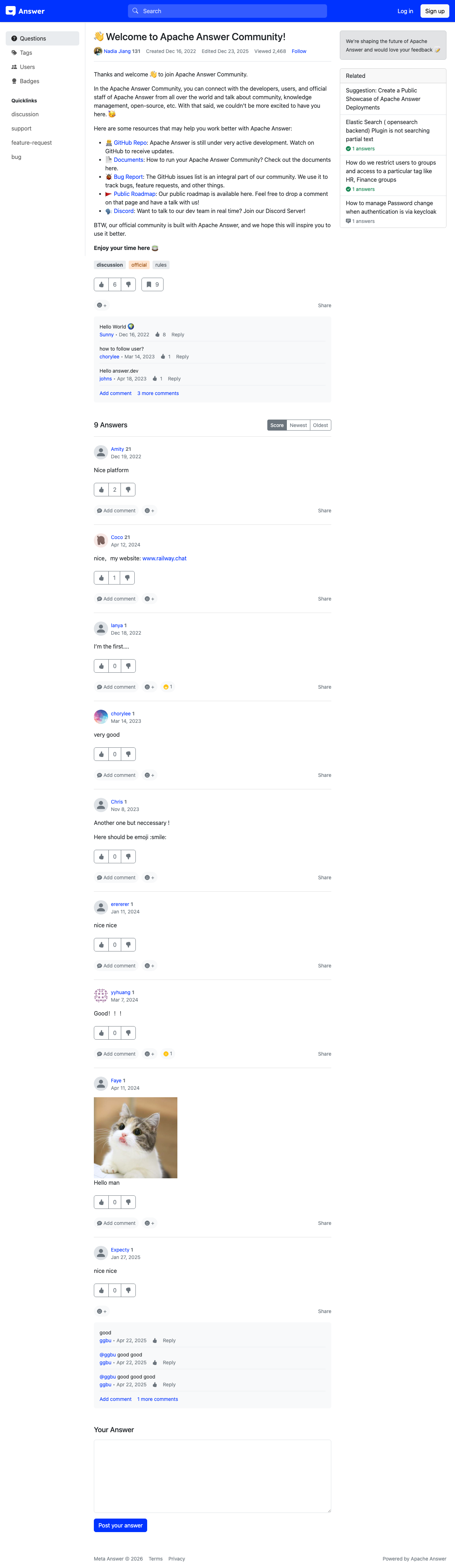
Question Page Layout
A question detail page contains several sections:
Question Header
At the top, you'll find the question title [1] displayed prominently. Below it, the author's name [2] is shown along with the posting date and view count.
Following a Question
Select the Follow button [3] next to the question to receive notifications when new answers or comments are added. This is helpful for tracking questions you're interested in but haven't answered yet.
Question Body
The main content area displays the question text with full markdown rendering, including:
- Formatted text with headings, bold, and italic
- Code blocks with syntax highlighting
- Links [4-5] to external resources like GitHub repositories and documentation
- Images and embedded media
- Tables and lists
Voting
To the left of the question (or answer) text, voting controls let you upvote or downvote the content. Voting helps surface the most helpful questions and answers. You need to be logged in and have sufficient reputation to vote.
Tags
Below the question body, associated tags are displayed. Select any tag to browse other questions with the same tag.
Answers Section
Below the question, all answers are listed. Each answer shows:
- The answer text with full markdown formatting
- The author's name and reputation
- Vote count
- Whether the answer has been accepted by the question author
- A timestamp showing when the answer was posted
Answers are sorted by votes by default, with the accepted answer pinned to the top.
Adding Your Own Answer
To post an answer, scroll to the bottom of the page where you'll find a markdown editor. Write your response, preview it, and submit. You must be logged in to answer questions.