Appearance
Getting Started with Apache Answer
Apache Answer is a Q&A platform that helps teams and communities build shared knowledge bases. This guide walks you through the core interface and how to navigate the platform.
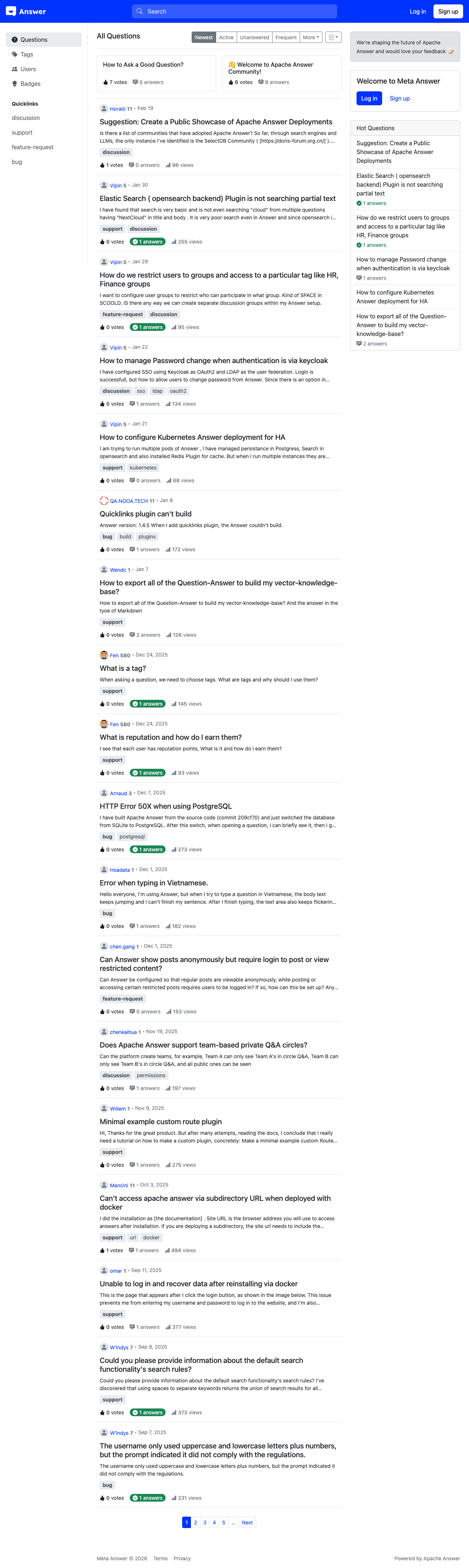
The Main Interface
When you first visit an Apache Answer instance, you'll see the homepage displaying recent questions from the community. The interface is divided into several key areas:
Left Sidebar Navigation
The left sidebar [1-6] contains the primary navigation links:
- Questions [1] — Browse all questions posted to the community
- Tags [2] — Explore topics organized by tag categories
- Users [3] — View community members and their contributions
- Badges [4] — See achievement badges available in the community
Below the main navigation, you'll find Quicklinks [5-6] — shortcuts to popular tags like "discussion" and "support" that help you jump to frequently-used topic areas.
Content Sorting Options
Above the question feed, sorting tabs [7-10] let you organize questions by:
- Newest [7] — Most recently posted questions
- Active [8] — Questions with recent activity (new answers or edits)
- Unanswered [9] — Questions waiting for answers
- Frequent [10] — Questions with the highest view counts
Creating an Account
To participate in the community, select Log in or Sign up in the top-right corner of the page. Once registered, you can ask questions, post answers, vote on content, and earn reputation points.
What You Can Do
Apache Answer supports a full Q&A workflow:
- Ask questions — Post questions with markdown formatting, code blocks, and images
- Answer questions — Share your knowledge with detailed responses
- Vote — Upvote or downvote questions and answers to surface the best content
- Comment — Add clarifying details or follow-up notes
- Tag — Organize questions with topic tags for better discoverability
- Earn reputation — Build credibility through community contributions