Appearance
Exploring Tag Detail Pages
When you select a specific tag, you'll be taken to the tag detail page, which shows all questions associated with that topic.
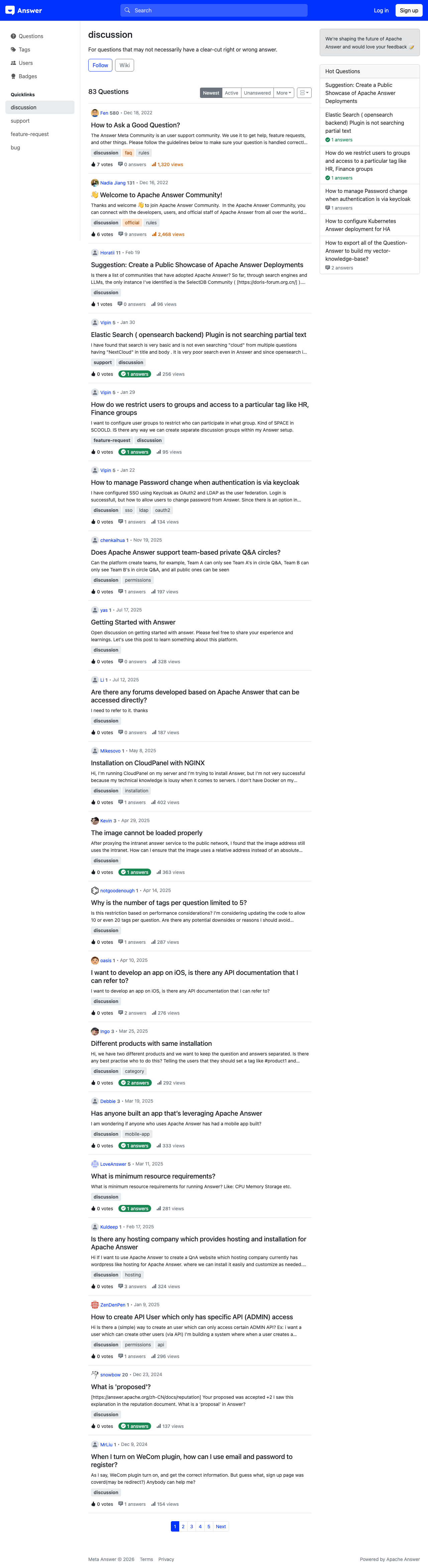
Tag Detail Layout
The tag detail page displays the tag name [1] as a heading, followed by:
Tag Actions
- Follow [2] — Subscribe to this tag to receive updates when new questions are posted with it. The button toggles to "Following" once activated.
- Wiki [3] — View the tag's wiki page, which contains a community-maintained description of the tag's scope, usage guidelines, and related tags. Editors with sufficient reputation can update the wiki.
Tag Description
Below the actions, a brief description explains what the tag covers and when to use it.
Tagged Questions
The main area lists all questions that carry this tag. You can sort the list using the tabs:
- Newest [4] — Most recently posted questions with this tag
- Active [5] — Questions with recent activity
- Frequent — Most viewed questions with this tag
- Unanswered — Questions with this tag that still need answers
Working with Tags
Tags are a primary organizational tool in Apache Answer. Each community builds its own taxonomy of tags that reflects its focus areas. For example, a developer community might have tags for specific technologies, while a support community might use tags for product areas.
When you follow a tag, questions with that tag appear more prominently in your feeds, making it easier to focus on topics that match your expertise or interests.
Tag Following vs. Question Following
Following a tag subscribes you to all new questions with that tag. Following a specific question subscribes you to updates on that particular question only. Both are useful for staying informed, but tag following casts a wider net.