Appearance
Browsing and Searching Questions
The Questions page is the central hub of Apache Answer, where all community questions are listed and organized.
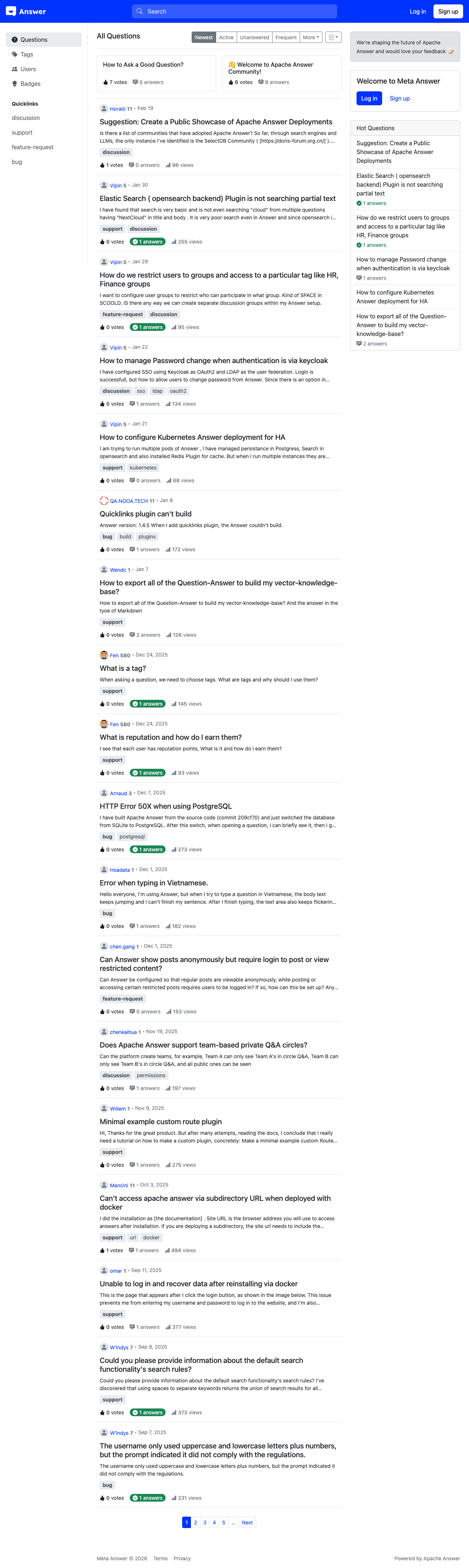
Viewing All Questions
Navigate to the Questions page by selecting Questions [1] in the left sidebar. Each question in the feed displays:
- The question title (click to open the full question)
- Vote count and answer count
- The author's name and avatar
- Tags associated with the question
- The time the question was posted
Sorting Questions
Use the sorting tabs [4-7] above the question list to change the display order:
- Newest [4] — Shows questions in reverse chronological order, with the most recently posted questions first
- Active [5] — Prioritizes questions that have received recent answers, edits, or comments
- Unanswered [6] — Filters to show only questions that have not yet received an answer — a helpful view when you want to contribute
- Frequent [7] — Displays questions sorted by view count, highlighting the most popular topics
Filtering by Tag
The sidebar Quicklinks section provides fast access to common tags. Selecting a tag filters the question list to show only questions with that specific tag.
For more granular filtering, visit the Tags [2] page where you can browse the complete list of available tags and follow ones that interest you.
Pagination
When a community has many questions, the list is split across multiple pages. Navigation controls at the bottom of the question list let you move between pages.